9th September 2025

|

ServiceM8

Snooze messages when you can’t deal with them right away

The ServiceM8 Inbox got a major upgrade in 2023, with search, filtering, bulk actions and more!

Inbox

One of the features that’s super helpful in the inbox is the Snooze function –

Not ready to deal with an inbox reminder?

Or perhaps the customer doesn’t want to go ahead with a service for a while…

… use the snooze feature to do just that – snooze the message for another day!

Use cases –

  • a message that’s for another member of staff when they’re not in that day
  • you get a reminder for a boiler service, but the customer wants to skip that year and be reminded in a few months / the following year
  • you’re not certain what to do with a message or reminder at the moment you’re processing the inbox

The snoozed messages will sit in their own tab, so at any point, you can go in and review them.
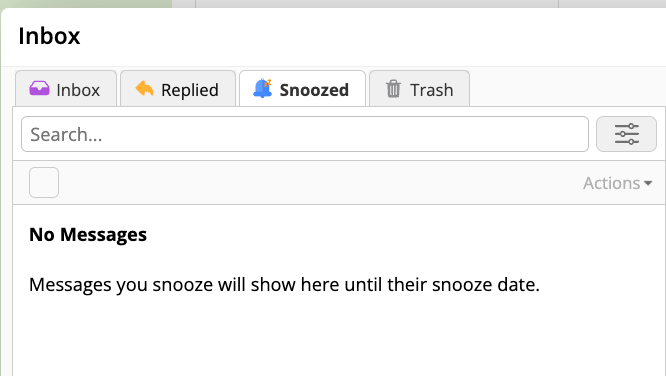
Snooze

Do you use the Inbox?

Hoping for any Inbox improvements in ServiceM8 14 – the 2025 round of updates?

REQUEST YOUR FREE
ServiceM8 ACCOUNT AUDIT

GET EXPERT 1:1 SUPPORT & TRAINING
FOR AS LITTLE AS £95

Leave a Reply

Your email address will not be published. Required fields are marked *

Hazel Portrait
ServiceM8 Logo - Gold ServiceM8 Partner Edition

Hi, I’m Hazel. I’m a Business Systems Specialist + ServiceM8 Gold Partner.

I can help you craft a business that’s easy and efficient to run.

I ran a plumbing and heating company for 10 years and in 2016 became a ServiceM8 Partner.

I’ve worked with hundreds of business owners just like you to implement easier and more efficient ways of running their business.

My mission is simple: to inspire you and help you develop an efficient and profitable business that gives you the time to do more of what you love.

IS SERVICEM8 RIGHT FOR YOU?

READY TO TRY OUT
SERVICEM8?

LOOKING FOR 1:1 SUPPORT & TRAINING?