
If you’re sending what ServiceM8 call a badge follow up automation email, then you may have noticed that these emails are sent from the name and email address of the staff who “Completed” the job.
Examples of badge follow up automations include:
- Review or feedback request
- Follow ups post job to check in with the customer
- Service or next visit reminders
You might not want the review or reminder to be sent from the staff member who completed the job, but instead, send it from another person in the company or just from the company itself.
I hate to say this, but you can’t choose who the emails are sent from.
However, you could anonymise your email sending generally, so that everything would show as coming from the company.
To do this, start by going to account > settings > preferences > email settings and change the email delivery setting to Send emails from: Company Email Address
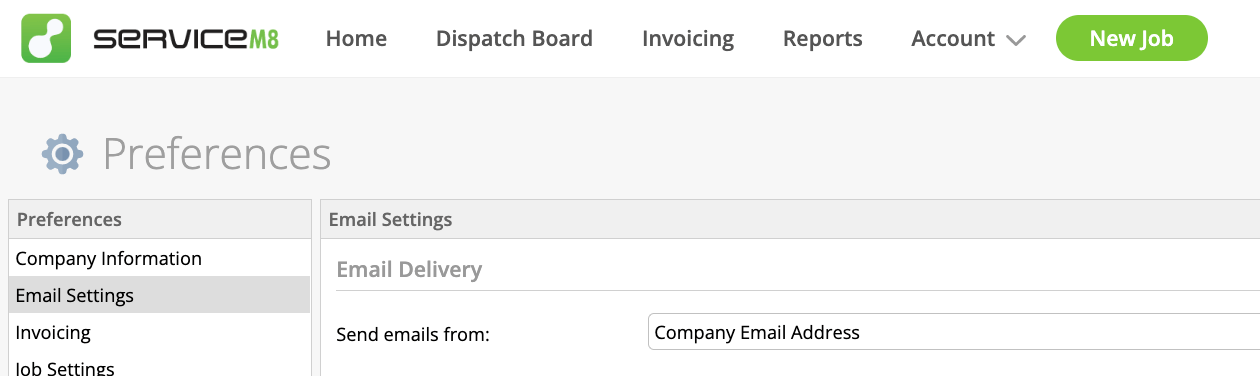
When set to Company Email Address, the company name appears as the email sender and all emails are routed through a single company inbox / outbox.
Next, you need to remove the staff member’s name fields and replace them with the name of the company.
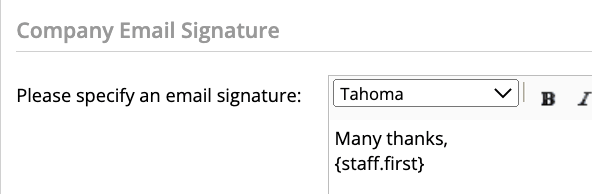
In the Company Email signature field,
Many thanks,
{staff. first}
should be replaced with:
Many thanks,
For example, this would change ‘Many thanks, Hazel’ to ‘Many thanks, ‘My Company Name’ ‘
Bear in mind that this change would affect all emails in and out of the company – individual staff members won’t get replies direct to them anymore. All emails will be routed through a single company inbox / outbox, so only make this change if you’re happy with the outcome.
Do you normally send emails through the company, or to and from individual staff members?


One Response
That’s brilliant Hazel!
Thank you for a simple yet effective work around to a problem that has been bugging me for a long time.
Looking forward to your next tips, ever so helpful as always!