
This is one of those features that exists for one reason… but turns out to be useful for something else entirely.
Most people think of the account backup in ServiceM8 as a safety net. Something you download occasionally, stick somewhere safe, and hope you never need.
But there’s a really handy secondary use for it — especially if you ever need to gather every PDF for a single client.
This usually comes up when:
- a client asks for all historic paperwork
- there’s a dispute or query months later
- an agent or commercial client wants a full record
- you’re tidying things up before handing work over
Trying to manually download invoices, quotes, certificates, photos and attachments job by job is painful. And easy to miss things.
The account backup gives you another option.
How this works in practice
When you download a ServiceM8 account backup, you get a structured folder containing all your data – including attachments and PDFs.
Here’s the useful bit I only really clocked recently:
If you search within the backup folders for the client name, it will often pull back all files that contain that name – invoices, quotes, certificates, attachments, the lot.
That’s because client names are usually embedded in the document content itself, even if the file name doesn’t make it obvious.
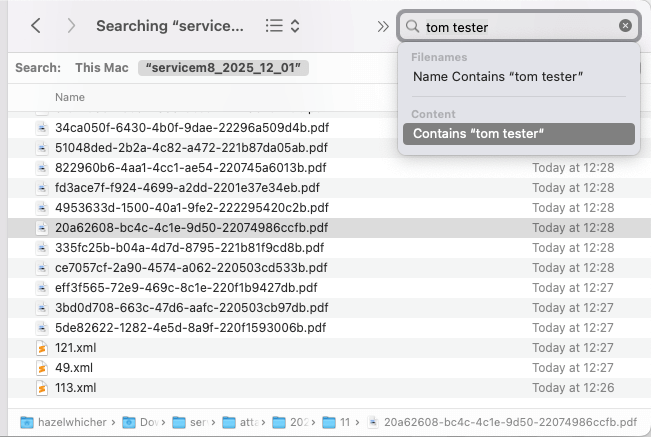
So instead of hunting job by job, you can:
- download the backup
- search within the files
- gather everything relating to one client in one go
The downside (because there always is one)
The big drawback is this:
The PDF file names are absolute gobbledegook.
They’re system-generated, not human-friendly. So you’ll see things like:
- random strings
- IDs instead of job numbers
- nothing that clearly tells you what the document is
That means you often need to:
- open the PDFs to check what they are
- or rename them once you’ve gathered what you need
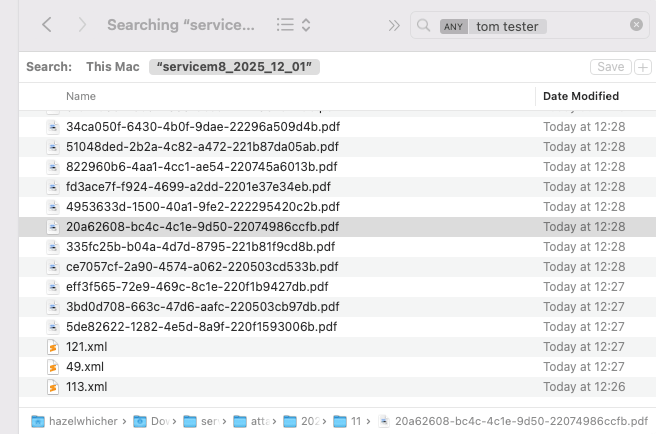
It’s not elegant. But it does work.
When this is worth using (and when it’s not)
This approach is great if:
- you need everything for one client, fast
- you don’t want to risk missing documents
- you’re dealing with historic data
It’s probably overkill if you just need one invoice from last week.
Think of it as a bulk-recovery / bulk-review tool, not a daily workflow.
How to download the backup
ServiceM8 explain the process clearly here:
Once you’ve got the backup, it’s just a case of extracting it and using search sensibly.
This is one of those features that’s easy to ignore until the day you really need it.
So I’m curious:
- Have you ever been asked for everything relating to a single client?
- And if you have… how painful was it to pull together?

