1st July 2025

|

ServiceM8

How to change the display order of staff on the staff schedules screen

Did you know that you can change the order that staff are displayed on the staff schedules view?

Set a custom order and group their swim lanes together in whatever way makes sense for your business. That could be grouping them in teams, listing them alphabetically, or putting them in order of seniority.

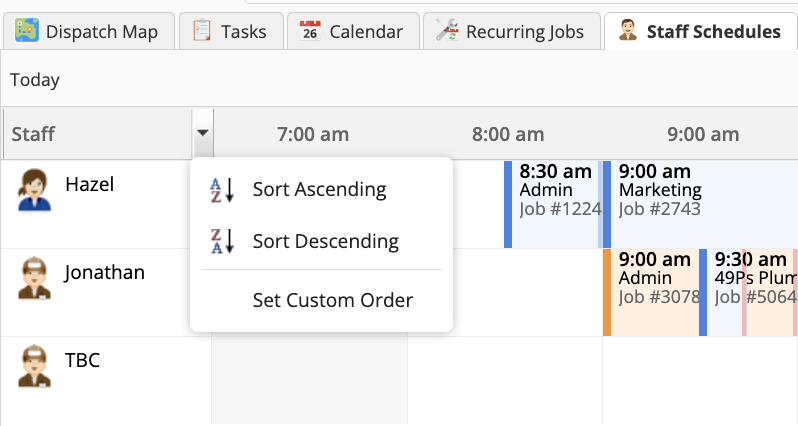
To do this go to the Staff Schedules view of the Dispatch Board on the online version of ServiceM8.

Hover over the Staff column heading and click on the dropdown arrow.

Click Set Custom Order
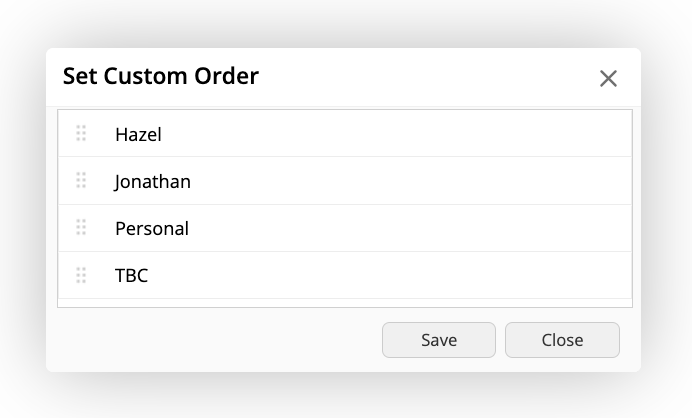
Drag and drop the staff names by hovering and clicking on the handles on the left hand side of each name, then hit Save
Did you know you could do this?!

REQUEST YOUR FREE
ServiceM8 ACCOUNT AUDIT

GET EXPERT 1:1 SUPPORT & TRAINING
FOR AS LITTLE AS £95

Leave a Reply

Your email address will not be published. Required fields are marked *

Hazel Portrait
ServiceM8 Logo - Gold ServiceM8 Partner Edition

Hi, I’m Hazel. I’m a Business Systems Specialist + ServiceM8 Gold Partner.

I can help you craft a business that’s easy and efficient to run.

I ran a plumbing and heating company for 10 years and in 2016 became a ServiceM8 Partner.

I’ve worked with hundreds of business owners just like you to implement easier and more efficient ways of running their business.

My mission is simple: to inspire you and help you develop an efficient and profitable business that gives you the time to do more of what you love.

IS SERVICEM8 RIGHT FOR YOU?

READY TO TRY OUT
SERVICEM8?

LOOKING FOR 1:1 SUPPORT & TRAINING?