
There’s a ServiceM8 warning that pops up on quoted, accepted jobs and it’s been annoying me (and my clients) something chronic.
You open a job that’s already been quoted and accepted, and there’s a banner sitting in the job card saying “The Price of some items have changed since they were added to this job,” with a big green “Apply Changes” button sat right next to it.

I’ve had a few people ask me about this recently, and the question is always the same: “I haven’t touched my pricing. Why is this happening? How do I switch it off?”
Here’s what’s going on – It’s a setting called Save As You Go, buried in Account > Settings > Preferences > Job Settings > Items & Services.
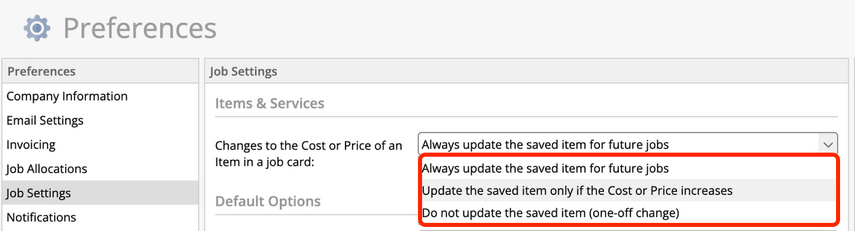
If that’s set to “Always update the saved item” or “Only update if the price increases,” then any time anyone changes a Cost or Price on any job card, it updates the master item in your Materials & Services database. Not just that job – the master record everyone pulls from.
So the next time that same item shows up on a different job, ServiceM8 compares what’s stored on that job to the new master price, sees they don’t match, and throws up the warning. It doesn’t matter that the job’s already been quoted. It doesn’t matter that the client’s already accepted it. The system just sees a mismatch and asks if you want to fix it.
So that’s the bit that matters: don’t click Apply Changes on a job that’s already been quoted or accepted. Doing that can change a price your client has already agreed to – which is a much bigger problem than the warning itself.
I’ve had a few questions about this recently, and the only answer I’ve got for you is to go and check that Save As You Go preference. If you don’t actually need item prices updating themselves in the background, switch it to “Never update” and then ignore the message when it comes up on a job. It’s not going to break anything by sitting there. It’s just noise.
I’m sorry it’s not a better answer!
Feel strongly about this? Pop an email over to support@servicem8.com asking them to remove the message, or allow you to hide the message / switch off the setting entirely. The more people who do this, the more likely ServiceM8 are to pay attention and do something about it 🙂

