
ServiceM8 15 has given the Schedule button on the Job card a proper upgrade, and it’s one of my favourite office changes in this release.
When you click Schedule on a Job card in the Online Dashboard, you now get a weekly availability view with suggested times already picked out. Unavailable time is shaded, so the gaps jump out at you.
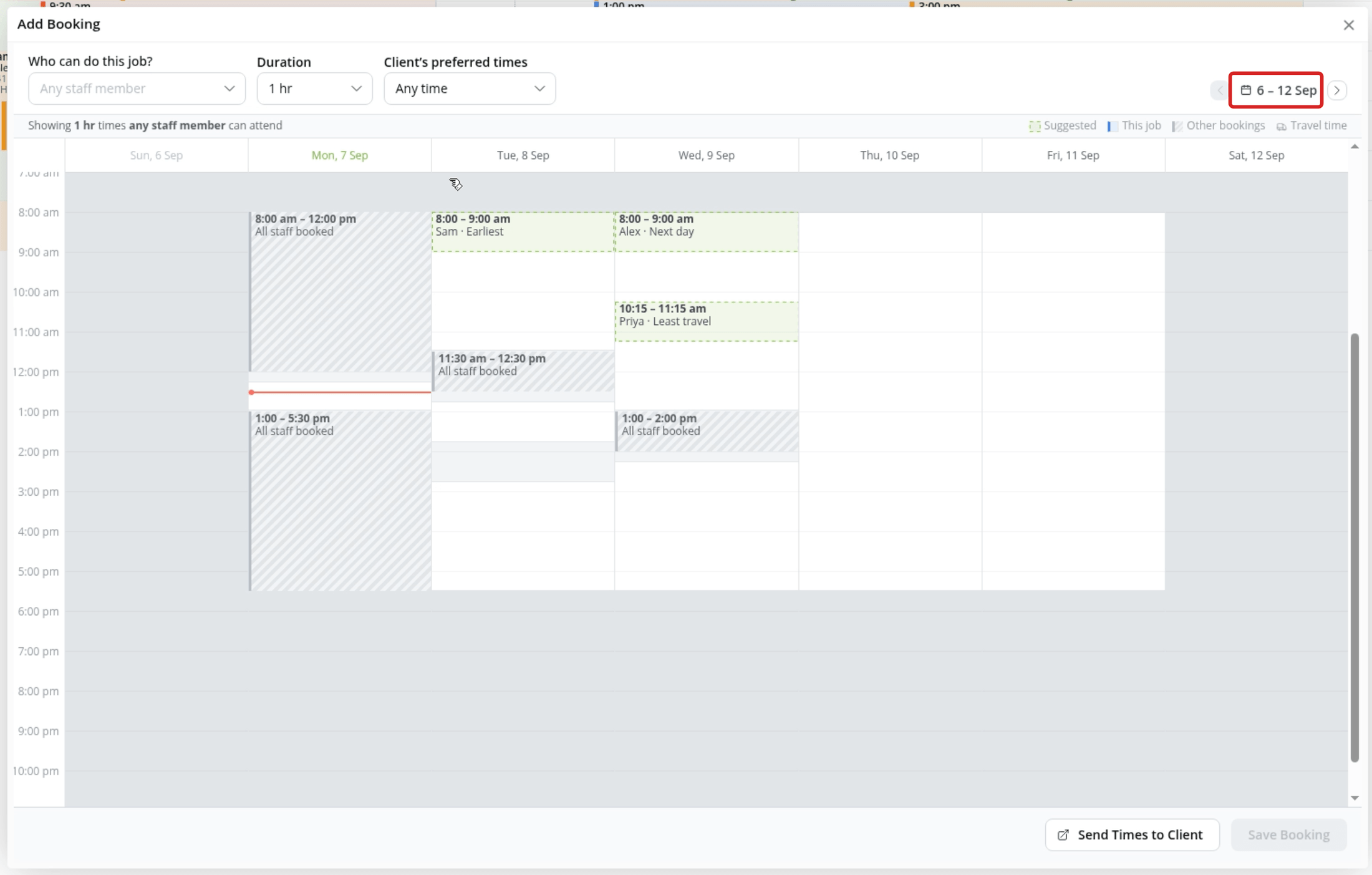
Here’s what makes it so useful:
- See one engineer’s day properly. Select one person under Who can do this job? and you’ll see their existing bookings, travel time and gaps.
- Book around the customer. Under Client’s preferred times you can pick Mornings, Afternoons, After 3pm or type a custom preference. If the customer’s availability is already written in the Job Notes, ServiceM8 can pick it up and suggest it for you.
- Book teams, not just people. Choose whether you need any one of your eligible staff or all of them together. With three or more eligible people, you can also choose any two together.
- Multi-day jobs in one go. Choose Multiple days, pick each work date (they don’t have to be consecutive) and set the daily start and finish times. Each date saves as its own booking on the same job.
- Fewer double bookings. If you try to book over something, it warns you and the button changes to Save Anyway.
Here’s how to try it:
- Open the Dispatch Board, open a Job card and click Schedule.
- Choose who can do the job and how long it’ll take.
- Click a suggested time, or click into an available space. Drag it to move it, or drag the bottom edge to change the length.
- Check any warnings, then click Save Booking.
One more option: for a single visit with one person, you can click Send Times to Client and the customer gets an SMS link to pick a time themselves. The one thing I’d love to see added is the ability to send those times by email too. At the moment it’s SMS only.
This is one of those changes that sounds small on paper but saves time on every single booking. And it makes you look a lot more organised while the customer is still on the phone.
Have you tried the new Schedule option yet?
~ Hazel

