
If you’re quoting or invoicing anything bigger than a small job – for example a full rewire, a multi bathroom refurb, or a whole-house project, a huge list of line items doesn’t tell the client much. They’re staring at forty rows of parts and labour with no idea which bit relates to which room, stage, or day.
ServiceM8 added a fix for this a couple of years ago, and most people still don’t know it’s there: section description lines.
To use this feature – Add a new line item like you normally would, but instead of giving it a price, set the Quantity, Cost, and Price all to zero. All three, not just quantity and price. Cost is the one that’s easy to miss. Do that and the item name shows up on the quote or invoice as a clean section heading, with no numbers next to it. You can then drag it (and the items underneath) into place using the grab handles, so it sits exactly where you want it in the document.
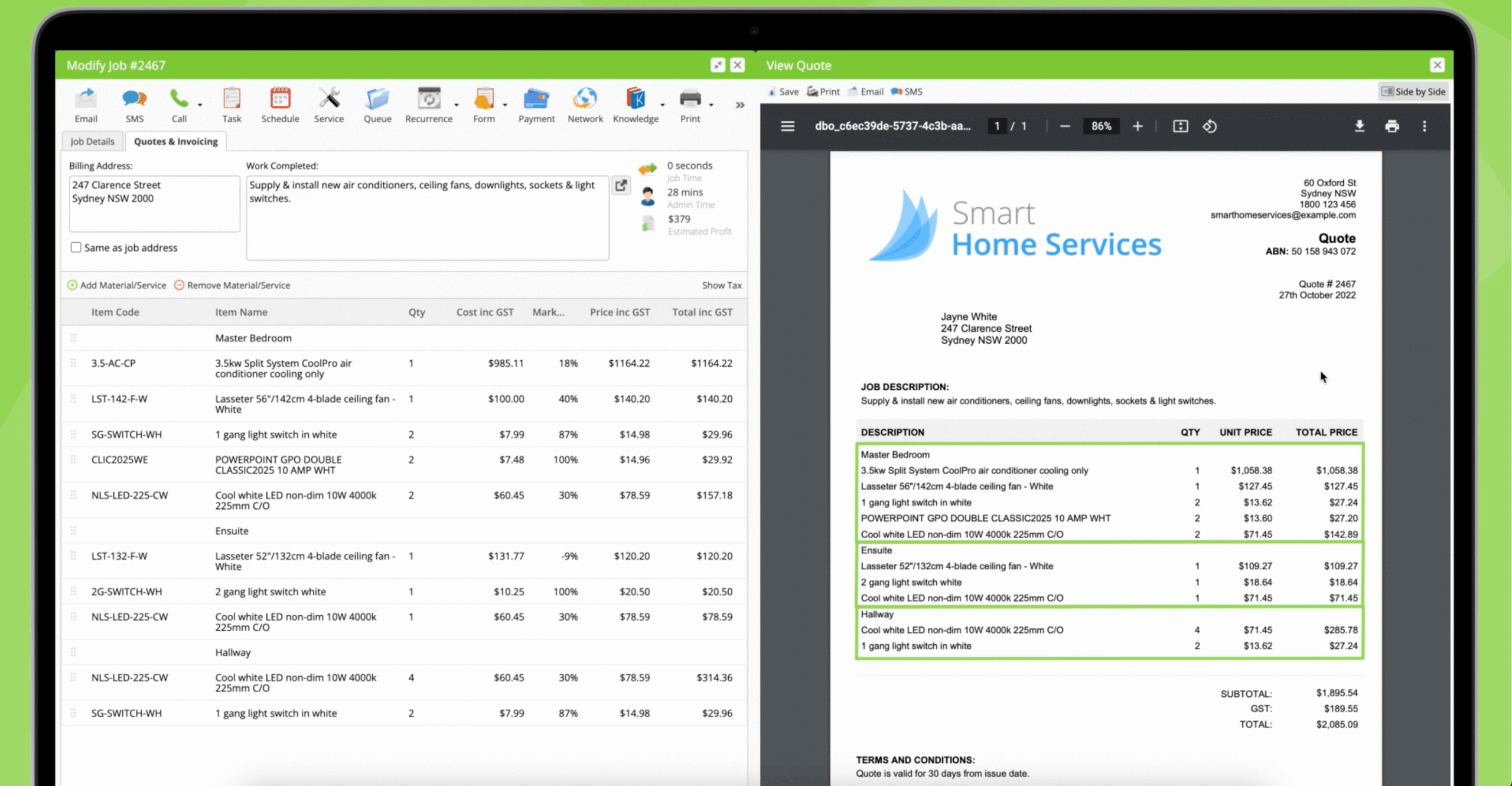
** Please note – ServiceM8 advise in their help article to leave the item code blank too, but if you use xero or quickbooks with ServiceM8 then this will cause an error, so add item code, item name and clear out everything else.
If you’re using ServiceM8’s standard itemised layout, you don’t need to touch your invoice template at all. This just works out of the box.
Where this gets useful is how you use it to break up the job.
A few ways I’ve seen work well:
- By room: Kitchen, Bathroom, Utility Room, so the client can see cost by area of the house
- By stage: First Fix, Second Fix, Snagging
- By staff member: useful if more than one engineer’s time is on the invoice
- By date: for jobs that run across multiple visits
ServiceM8 have put together a proper help article and video on this, which does a good job of showing the mechanics of how it works. Worth a look if you want to see it done step by step:
And if you want even more control over how services are grouped and presented, ServiceM8’s Bundles add-on lets you combine several materials, services, and labour lines into a single line item. That’s a separate feature worth knowing about, but section lines alone will cover most people’s needs here.

