
There’s probably a load of useful data sitting in your ServiceM8 account that you’ve never been able to get at.
Lead sources. Key return dates. Boiler makes. Landlord or homeowner. Gas safety due dates. Warranty expiry.
Most of the businesses I work with set up custom fields for this stuff at some point. The team fill them in (mostly). And then nothing happens with them. Getting a report out has always meant an export, a spreadsheet and half a Friday afternoon, or paying for a separate reporting tool.

Here’s something I found in ServiceM8 this week that’s changed how I think about this.
The AI report builder in ServiceM8’s Reports can see your job custom fields. But it can’t see your client custom fields. So if you store lead source against the client, which loads of people do, it can’t report on it.
Office Agent can read both.
I tested it with a job custom field called “Key Return Due Date” on a few test jobs. I asked it, in plain English, whether it could see the field and tell me if any of the dates had passed.
It came back with a table. Job number, due date, passed or not yet due. It also picked out the job that had no date set at all.
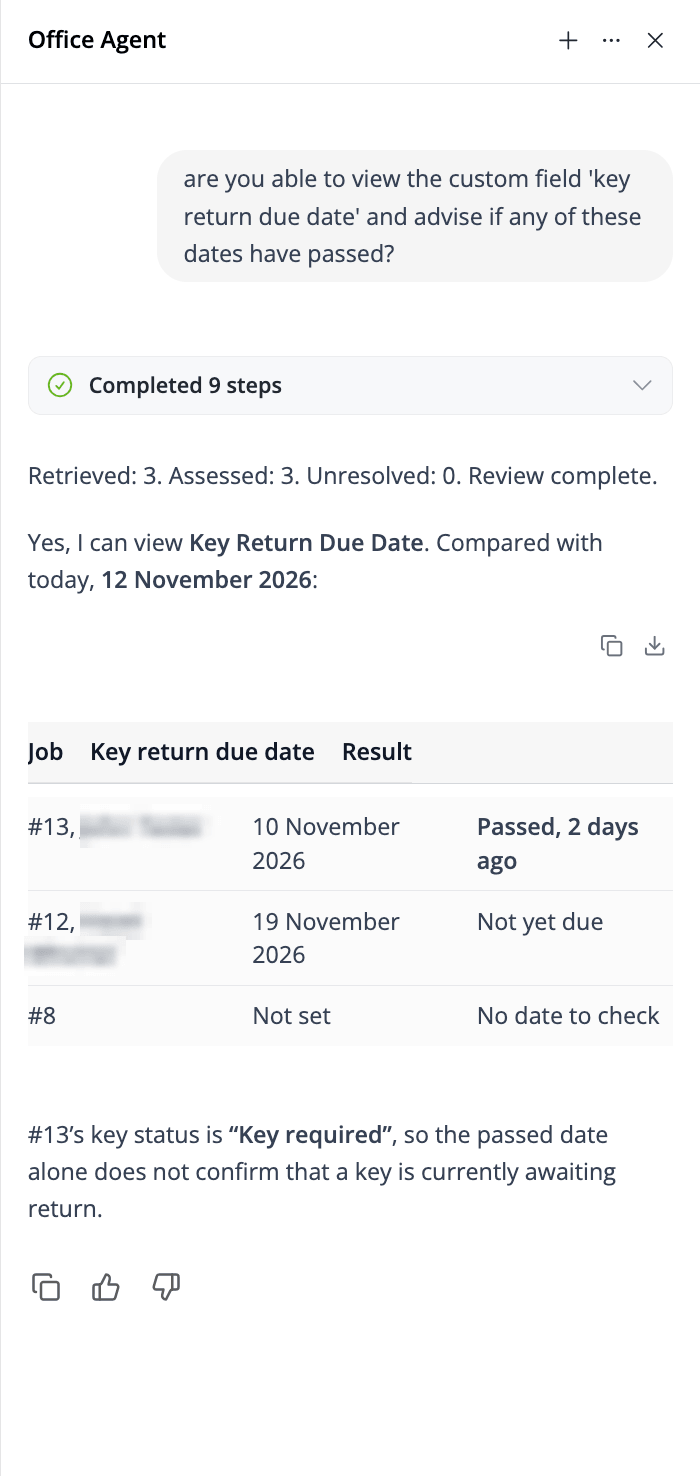
Then it did something I didn’t expect. It pointed out that the overdue job still had a key status of “Key required”. So the date had passed, but that didn’t prove there was a key sitting in someone’s van that should’ve gone back. It spotted that two fields didn’t quite agree and flagged it, instead of just telling me what I wanted to hear.
A spreadsheet wouldn’t have done that.
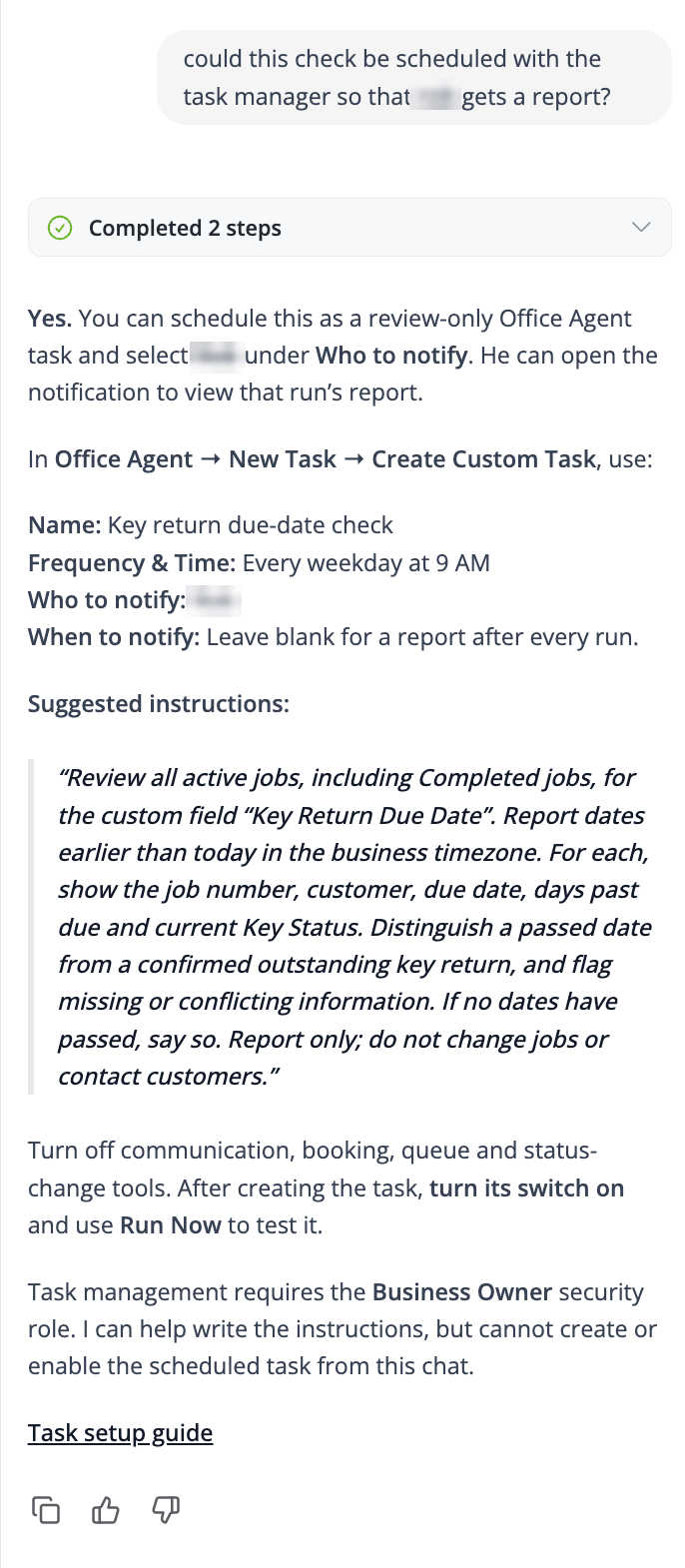
Then I asked whether it could run that check automatically and send the office manager a report. It wrote the whole scheduled task for me. Name, frequency (every weekday at 9am), who to notify, and the instructions, including “report only, do not change jobs or contact customers”. It even told me which tools to switch off so it can’t start messaging customers or moving jobs about.
Where I’d use this:
- Which lead source brought in the most work this quarter
- Compliance and service due dates stored in custom fields
- Keys, access codes or permits with a return or expiry date
- Client type: landlord, letting agent, commercial, homeowner
A few things to know before you try it:
- Chat comes with current ServiceM8 plans, with a daily usage allowance. Scheduled tasks need Office Agent Pro (£29 a month in the UK), and only someone with the Business Owner role can set them up.
- New tasks start switched off. Turn it on, then hit Run Now to test it before you rely on it.
- It’s only as good as what’s in the fields. If half your team leave lead source blank, the AI can’t fill the gaps for you.
- Check its answers for the first few weeks. Treat it like a new starter in the office, don’t assume the answers are perfect initially.
Does this mean you can drop separate reporting tools like Wink Reports? For some businesses, maybe. If you’ve mainly been paying for one to get at your custom field data, test Office Agent before your next renewal date. If you rely on proper dashboards and charts, I’d keep both for now.
What custom fields have you got in your account that you’ve never actually reported on? Pop them in the comments and I’ll tell you what I’d ask Office Agent.

